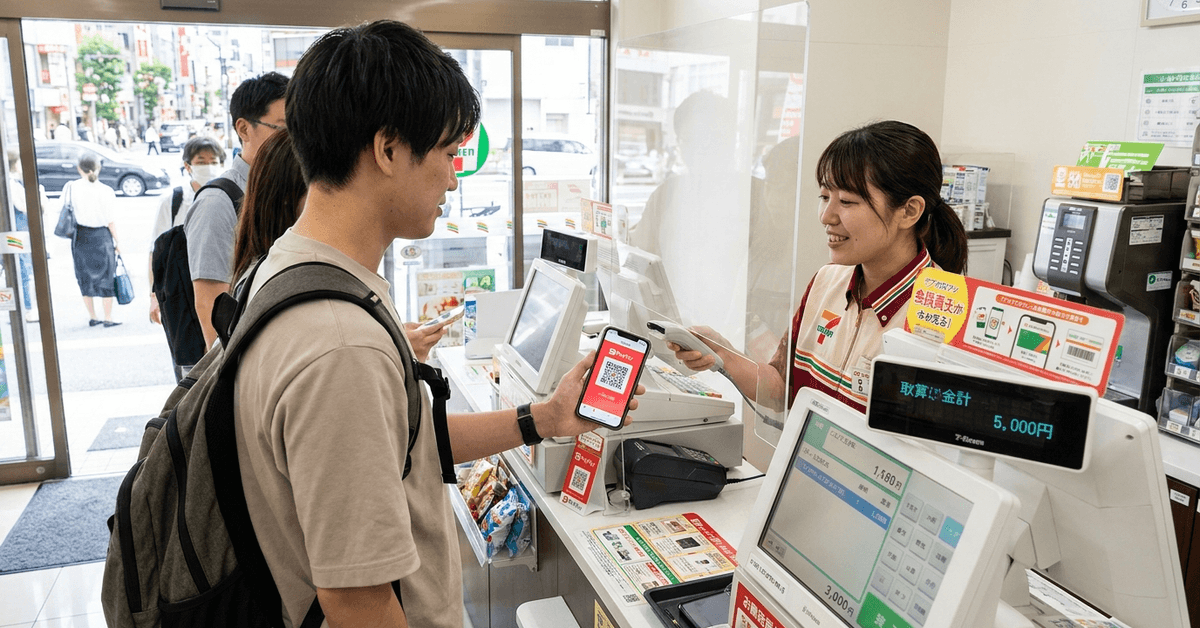
Two apps open, one register, and a line of people behind you. That's the PayPay at 7-Eleven experience nobody warns you about before your first konbini run in Japan.
The 7-Eleven Japan app and PayPay don't talk to each other. You can't tap a PayPay button inside the 7-Eleven app to pay. They are two completely separate systems that happen to work at the same counter.
This guide is for the traveler or expat standing in a Tokyo 7-Eleven for the first time, phone in hand, wondering which app to open first.
Does 7-Eleven Japan Accept PayPay?
Yes. PayPay is accepted at most 7-Eleven stores across Japan as a QR code payment method. But the payment happens through PayPay's own standalone app, not inside the 7-Eleven Japan app.
That distinction trips up a lot of first-time visitors. You'd assume a store's own app would let you pay with popular wallets.
Retailers like FamilyMart have moved toward tighter integrations. 7-Eleven keeps its loyalty program and payment processing on separate rails.
The Two-App Problem at Checkout
When you reach the register, the cashier expects one of two things: cash or a payment code from a dedicated app. If you want to use PayPay, you open the PayPay app, tap "Show Code," and let the cashier scan your screen.
The 7-Eleven app handles a different job. It stores your membership barcode for earning nanaco points and accessing app-only coupons. You scan that barcode before the cashier processes payment.
Scanning Order Matters for Points
I would skip the 7-Eleven app entirely if I weren't earning points on a longer stay. But if you do use both apps, the order is specific: membership barcode first, PayPay QR code second.
Reverse that, and the transaction closes before the loyalty scan registers. You lose the points and there's no way to retroactively add them.
Step-by-Step: Paying at 7-Eleven Japan Using PayPay
The process takes about 15 seconds once you've done it twice. PayPay uses QR codes for all in-store payments at 7-Eleven.
- Open the PayPay app before you reach the register.
- Tap "Show Code" on the home screen.
- Hold the QR code toward the cashier. At some locations, you scan the store's code instead.
- Wait for the confirmation chime on your phone.
- If you use the 7-Eleven membership app, scan that barcode before step 3.
Staff at most locations are familiar with this flow. A brief pause while you switch apps won't bother anyone.
What If the Cashier Points to a Scanner?
Some 7-Eleven stores use customer-facing scanners instead of handheld ones. The cashier will gesture toward a small screen near the register. Hold your PayPay QR code under it. The rest works the same way.
Why 7-Eleven Doesn't Integrate PayPay Directly
The 7-Eleven Japan app is a loyalty and coupon platform, not a payment wallet. After the 7pay security breach in 2019, 7-Eleven shut down its own payment feature within months of launch. The company lost roughly ¥38.6 million to unauthorized charges in that incident.
Since then, 7-Eleven has kept payment processing outside its own app entirely. Each wallet (PayPay, LINE Pay, Rakuten Pay, Suica) runs through its own dedicated app at checkout. No timeline exists for changing that approach.
I think this separation makes more sense than people give it credit for, especially after the ¥38.6 million 7pay loss in 2019.
Keeping payment credentials out of the 7-Eleven app reduces the attack surface if another breach happens. The inconvenience of switching apps is a reasonable trade.
Topping Up PayPay at a 7-Eleven ATM
PayPay balances can be topped up using cash at 7-Eleven ATMs through the "スマホでATM" (Smartphone ATM) feature. This is useful if you don't have a Japanese bank account linked to PayPay.
The process works like this:
- Open the PayPay app and go to "Top Up" then select "ATM"
- Choose Seven Bank ATM on the screen
- The ATM displays a QR code. Scan it with PayPay.
- Enter the cash amount you want to add and feed the bills into the machine
Minimum top-up is ¥1,000. The ATM interface has an English language option, though some screens revert to Japanese mid-process. Budget an extra minute for that.
ATM Top-Up vs. Bank Transfer
| Method | Speed | Requires Japanese Bank Account | Minimum Amount | Fee |
|---|---|---|---|---|
| 7-Eleven ATM (cash) | Instant | No | ¥1,000 | Free |
| Bank transfer | Instant | Yes | ¥1 | Free |
| Credit card | Instant | No (international cards vary) | ¥1 | Free |
For short-term visitors without a Japanese bank account, the ATM cash top-up is the most reliable option. Credit card linking works for some international Visa and Mastercard cards, but acceptance is inconsistent.
Who Should Bother Downloading the 7-Eleven Japan App?
The app is free on iOS and Android. But downloading it makes sense only in specific situations.
If you're staying in Japan for two weeks or less, I would skip the 7-Eleven app entirely and just use PayPay. The points you'd accumulate over a short trip are negligible.
A ¥500 purchase earns roughly 1 to 5 points depending on active campaigns. That's not worth the screen space or the fumbling at checkout.
For expats or longer-term residents, the app's coupon system can save ¥50 to ¥100 per visit on specific items. Those coupons rotate weekly and sometimes include free items on new product launches.
Getting PayPay Set Up as a Visitor
PayPay registration requires a Japanese phone number. If you're using a travel SIM or eSIM, confirm it can receive SMS verification codes before you try to register. Some data-only SIMs won't work.
The app's interface defaults to Japanese. An English toggle exists under settings, but label translations are partial. Payment screens and QR functions work fine in English. Account management pages sometimes don't.
Questions People Ask About PayPay and 7-Eleven Japan
A few things come up repeatedly for visitors sorting out this payment setup.
- Q: Can you link PayPay inside the 7-Eleven Japan app?
No. The two apps share no account linking or integration. Your PayPay wallet and your 7-Eleven membership exist on separate platforms. Scanning both at checkout is a manual two-step process. - Q: Does PayPay work at every 7-Eleven in Japan?
Almost all locations accept it, but a small number of franchise stores in rural areas may not have QR code readers. If you see a PayPay logo sticker near the register, you're good. - Q: Can tourists register for PayPay without a Japanese bank account?
Yes. You can register with a Japanese phone number and top up via ATM cash or a compatible international credit card. The bank account link is optional. - Q: What happens if PayPay's QR code doesn't scan?
Screen brightness is the most common issue. Turn your brightness to maximum. If the scanner still fails, the cashier can manually enter your payment code. That code appears below the QR image in the PayPay app. - Q: Are there PayPay cashback campaigns at 7-Eleven?
PayPay runs periodic cashback campaigns, sometimes offering 5% to 20% return at specific retailers. These rotate monthly and are listed in the PayPay app under the "Offers" tab. 7-Eleven participates in some but not all campaigns.
Conclusion
Japan's convenience store payment system rewards people who learn the two-app rhythm early. PayPay handles the money, the 7-Eleven app handles the perks, and the cashier just needs your screen.
Once you've done it three times, the whole thing takes less time than counting coins. And honestly, that's the part about Japan's "cash culture" that aged the fastest.